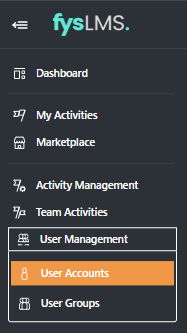
- Select the "User Management" tab located in the left navigation menu and then the "User Accounts" tab in it's dropdown box.
- Select the "Filters" button on the top right of your page.

- Select the toggle slider next to "View Disabled Accounts".

- The table of users will change to show only Disabled accounts, you will know this has occurred as the "User Accounts" state will have changed from 'Enabled' to 'Disabled' as seen below.
English