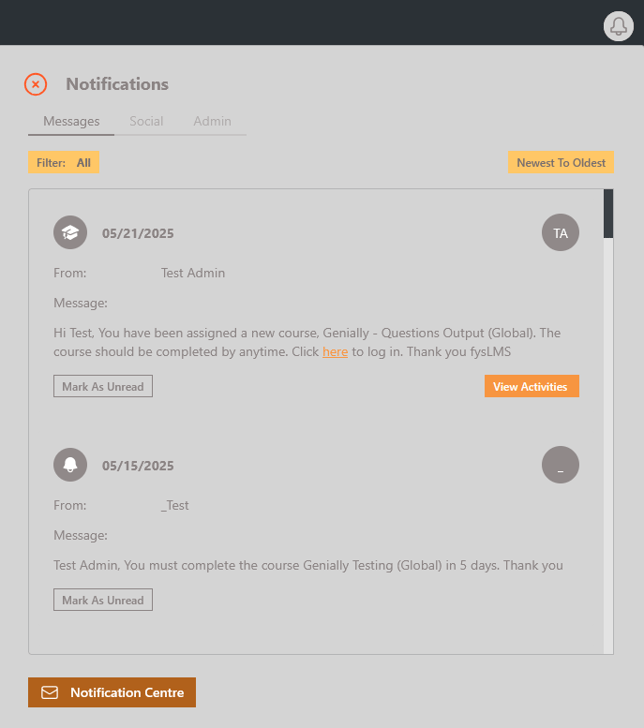
- After logging into your platform, click the bell button on the top right of your screen and then the "Notification Centre" button on the bottom left of the generated pop-out.
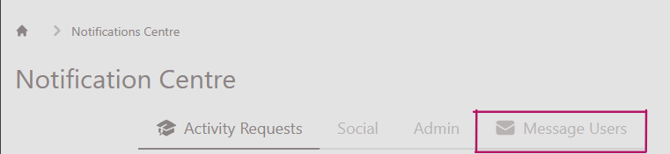
- Once the page has loaded go to the "message users" tab.
- Use the "Audience" search bar and table to find and select the users you want to send the message too.
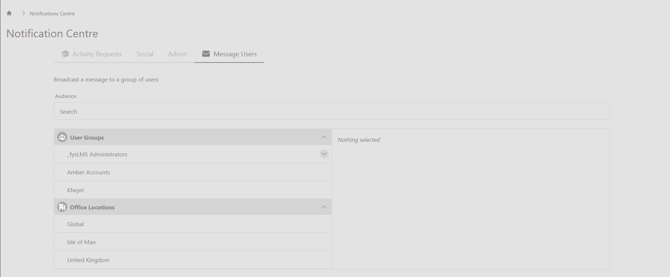
- For individual or small groups of users, use the search bar to filter by names and select each individual needed.
- you can also use the table in this section to select bulk categories of users, this can either be done through selecting their user group, provided you have set up the platform to organise users by relevent user groups, or by selecting office locations.
- To learn how to set up user groups to help with this process read the guide linked here.
- Once you have selected the users you need to message through the platform you can then edit the message you want to send out to users. This automatically generates the template for your site to assist with this process.
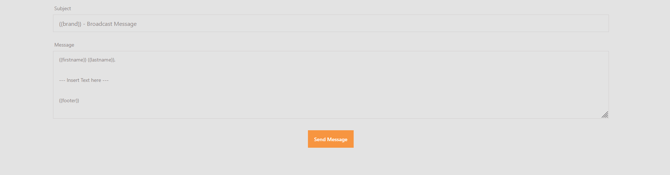
- Once you are happy with the message and users who will recieve it, click the "Send Message" button.
- This process shouldn't take too long and give you the below notification to inform you of its success.
English